Search
  Sign Up
  VIP Club
Cashy Casino, Registration, Login and Verification Processes
A successful Cashy Casino login provides you with access to over 7,000 slots, table games and live dealer titles for real money. Users will need to register a user profile and complete the necessary anti-money laundering and identity check as well as age verification to access dashboard.
Benefits of Having a Personal Account with Cashy
There are many reasons to register at the platform. Some benefits of Cashy Casino login are:
- Real money gaming: Users with active profiles can access their 7,000 real money games and earn loyalty points.
- Exclusive offers: 25% cashback, a VIP scheme and Slot Royale tournament.
- Improved security: Gaming is safe with SSL encryption, a standard privacy policy and 2-factor authentication.
- 24/7 Support: Customers who are signed in have faster support on the live chat and email.
- Fast Payments: Users can get fast deposits and withdrawals using the fiat and cryptocurrency options. Users will also get higher limits as they continue to use play.
- Bet History: Access your bet history and view which games were the most profitable.
How to Register for a Cashy Casino Account
The registration is open to anyone who are at least 18 years old. They only need to have a valid email to register their Cashy Casino login credentials. Here is a simple sign-up guide:
- Fill the form: Access the sign-up tab in the right corner. Enter a valid email address and click Continue. The second page asks users to create a password, choose a currency and accept the terms and conditions.
- Submit: Confirm the registration by clicking the “Sign up” button and the platform registers the new account.
- Confirmation: They’ll send an account activation link in the email; click it to confirm the address. Since Cashy only requires your email for registration, there is no need for SMS verification.
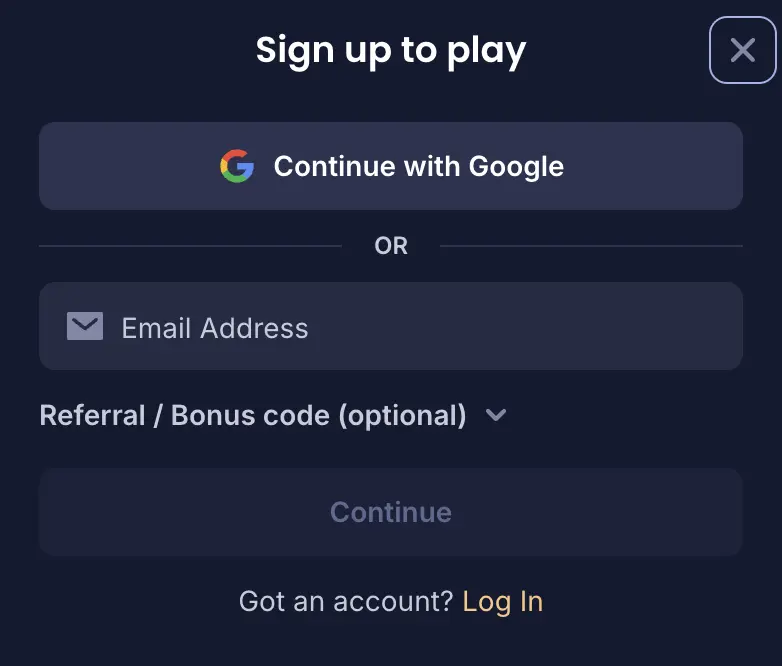
Players can then fill in their personal details, pass age confirmation and fund the new account to start gaming. The entire opt-in process takes less than 5 minutes.
Required Documents for Players
All new customers must verify their personal details through the verification process. It’s a routine part of the safety protocol. They must provide the following documents to meet the regulatory requirement:
- Passport, Driving License or government-issued ID card for identity check.
- Utility bill, phone bill or bank document for address verification.
- Screenshot of online banking, a bank statement or the Skrill page for anti-fraud and payment methods checks.
The site requires a complete data match on those, so double-check everything before sending. Once everything is done, you’ll get a withdrawal unlock for your winnings.
Getting Verified at Cashy
Verification procedures require uploading a clear image of the right document in JPEG, PNG, JPG or PDF file format. The steps include:
- Access the profile: Click the profile icon after successful Cashy Casino login and choose “My Account” from the list.
- Go to verification: Open the dropdown menu and pick verification from the options. This lists the various types of verification on the upload portal.
- Choose type: Select any of the confirmation types by clicking the “Upload Document” link.
- Upload: Choose the type of document to upload and select it from the storage. Submit the upload and repeat steps 3 and 4 to upload files for other confirmations.
- Wait for confirmation: Users must wait for the casino’s confirmation message about the procedure. Processing time is usually 1 hour, but it can take up to 12 hours. The status can be success, failure with rejection reasons attached or a request for more documents. One possible rejection reason is inadequate clarity requirements, so make sure to send quality pictures or scans.
Tips: Make sure the uploads show the four edges of the document to avoid rejection. Don’t upload expired documents and ensure the sizes are below 10 MB.
Cashy Login Procedure
Accessing a user’s account is as simple as creating one. New and existing users can follow the step-by-step desktop access guide below. The guide also works for mobile login.
- Go to the login page: Locate and open the “Login” tab at the top of their official website’s homepage. This opens their login portal.
- Fill the form: Enter the Cashy Casino login email and password. Remember, the password is case-sensitive.
- Submit: Click the “Log In” tab to submit details and your secure session will begin. Head to the dashboard to see details of the account.
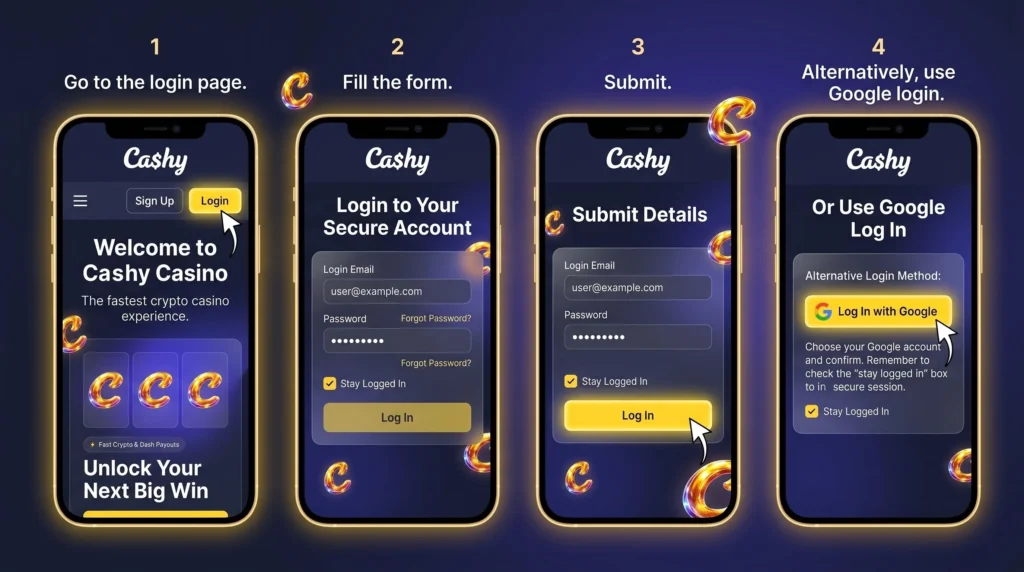
Alternatively, there is the Google login method. Here, users will need to choose the Google account and confirm the process. They’ll log users in at once; this method is for those who followed the Google account creation route. Remember to check the “stay logged in” box if you are prone to forgetting login details.
Login via Mobile App
Players can get quick access to their account with the simple mobile Cashy Casino login. The Progressive Web Application is standing in for a dedicated application and offers secure server, 2-factor authentication and data privacy. It also offers data privacy with its encrypted connection.
They only need to:
- Get the app by adding it to the homescreen.
- Open the application.
- Enter their email and password.
Personal Data Protection and Security
Alll users’ information is safe and confidential. They protect payment, withdrawal and other activities with industry-standard Secure Sockets Layer encryption technology. Their customer support channels are active and customers can reset their Cashy Casino Login credentials easily. Some highlights are:
- Two-factor authentication (2FA)
- GDPR compliance
- 128-bit SSL encryption
Troubleshooting Login Issues
The following are some signing-in issues users might encounter on their platform, with the solutions to them:
- Incorrect details: This occurs when users mistype the registered Cashy Casino login email or password. Cross-check the details properly and try again.
- Forgotten password: The issue occurs when the player has forgotten their password. The user can click “Forgot Password?” to reset their password.
- Suspended account: An account may be suspended due to suspicious activity or a violation. Contacting their customer support is the best solution for this issue.
Recovering Forgotten Password or Email
Clicking the “Forgot Password?” The link will help users change their password. The page requests the registered email and they will send a password reset instruction to the email address. Users can choose their new password, confirm it and save it through the reset password link. I recommend contacting customer support if users misplace their email. Answering a few security questions will help recover this.
How to Delete Your Account at Cashy
Players can deactivate their gaming account for different reasons. The process includes:
- Contact support: Visit the support section and select either the email or live chat support channel.
- Request account deactivation: Let customer support know about deleting the profile.
- Answer security question: The player must answer some questions to help the platform confirm they truly own the account.
- Account deletion: They will process the deactivation within 24 hours and 7 days.
Upon successful deletion, every Cashy Casino login attempt fails. I recommend using the self-exclusion responsible gambling tool for those who only want a temporary account closure.